What Shramiq Solves
Contract labour often runs on spreadsheets and phone calls. Shramiq puts it on one record.
Contract-labour operations commonly spread requisitions, contractor rosters, overtime, wage and billing reconciliation, and licence expiry across email and spreadsheets. Shramiq puts them in a single workflow that each side sees through its own permissions.
Capability Flow
From requisition to paid statement on one record
Six stages connect the plant, the contractor and the worker. Each stage is permission-gated and written to the audit trail.
Requisition
A planner drafts the requirement: department, skill, headcount, shift and start date.
Approval
An administrator approves it. Pending approvals surface to the people who can decide.
Contractor sourcing
Contractors accept or decline, or bid on opportunities. One contractor's decline never affects another's.
Verify and deploy
Documents are reviewed before deployment. Headcount and CLRA licence caps are enforced and the rate is snapshotted.
Daily operations
Supervisors roster, mark attendance and decide overtime. Absences trigger replacement requests.
Close and bill
Only a closed period can be billed. Statements move from issued to approved to paid.
Workflow stages as implemented in the product.
Module Map
Everything hangs off the shared workforce record
Three role-based surfaces sit on one data model.
Platform Surfaces
Three portals, each showing the right slice
Navigation and actions are gated by permissions, so every user sees only the pages their role allows.
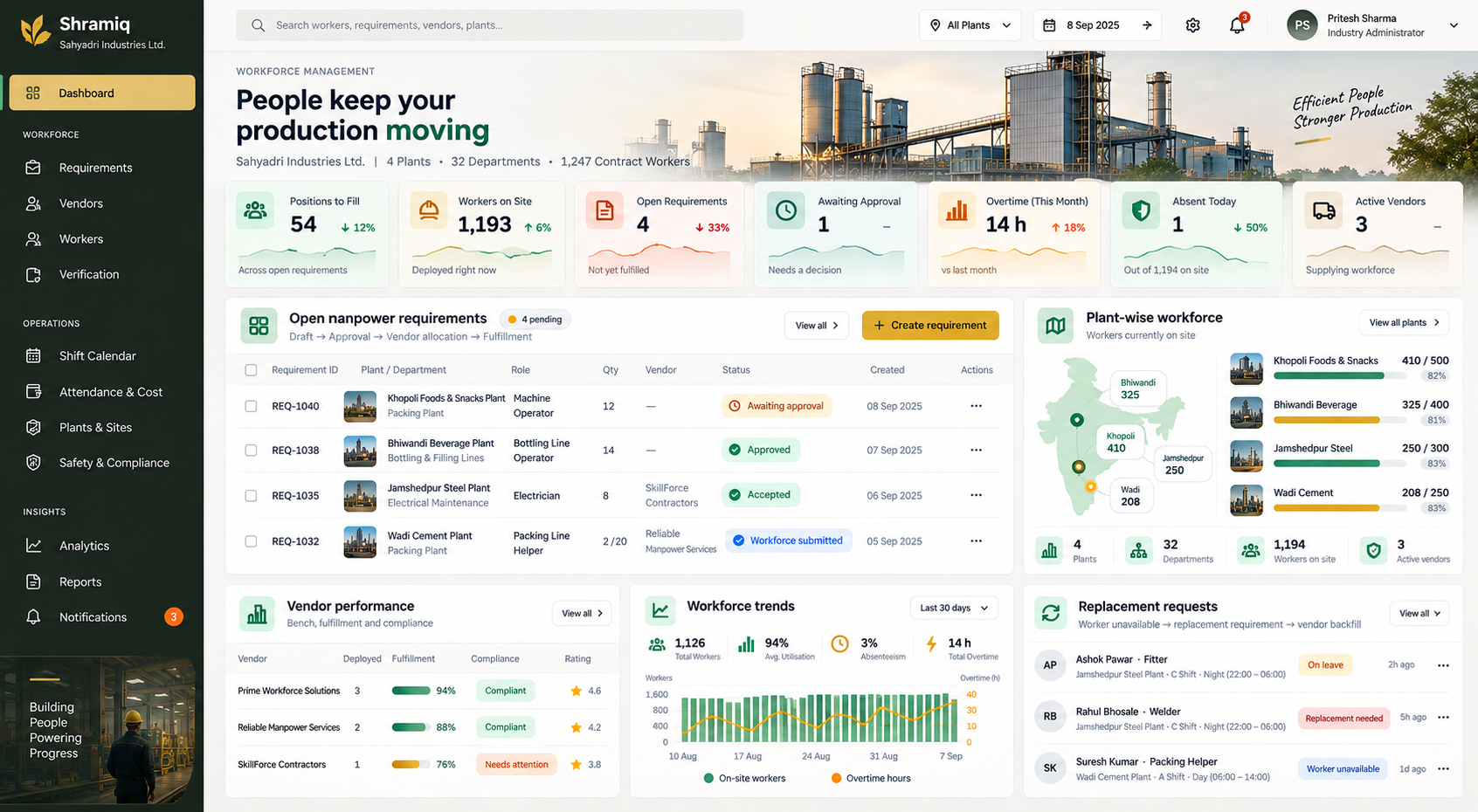
Industry console
A dashboard of positions to fill, workers on site, open requirements, approvals, overtime and absences, with vendor scorecards, plants and departments, rate cards and minimum wages.
- Includes: Requirements, opportunities, verification and licence review in one place.
- Includes: Analytics, utilisation, cost analytics and an audit viewer.
Vendor portal
Contractors accept requirements, bid on opportunities, manage their bench, invite workers, hold documents and licences, propose replacements and view statements.
- Includes: Performance, utilisation and rates visible to the contractor.
- Includes: Claims, reports and escalations routed to the right decision-maker.
Worker app
Workers sign in by mobile OTP, see shifts and the plant they are assigned to, claim attendance, view earnings by day, hold their digital work ID and raise a report.
- Includes: Opportunities matched to the worker's trade.
- Includes: Responsive and installable as a PWA, with a ten-language switcher.
Billing controls
Bill rate and wage rate are separate, rates are versioned and snapshotted onto each deployment, and a missing rate shows as 'rate not set', never zero.
- Includes: Every entry bills exactly once, enforced in the database.
- Includes: Closing a period is refused while overtime is undecided.
Identifiers and registers
Aadhaar, PAN, UAN and ESIC identifiers are validated, full Aadhaar and bank numbers are never stored, and registers are exported as extracts modelled on Form XVI and XVII.
- Includes: State-wise minimum-wage table and CLRA licence worker cap.
- Includes: Registers are labelled extracts, not filed returns.
Replacement and escalation
Shortfalls are derived from the roster. The contractor proposes a bench candidate, industry decides, and an escalation fires when a response SLA is missed.
- Includes: 48-hour vendor response and 24-hour change and replacement defaults.
- Includes: Grievances raised by workers are routed and tracked.
Trust and Governance
Controls built into the product
Shramiq's controls are enforced in the database and the access layer, not only in the interface.
Role-based access
Eight roles across industry, vendor and worker, with permissions that decide which pages and actions each user sees.
Tenant isolation
Another tenant's record returns not-found, so identifiers cannot be probed across companies.
Append-only audit
The audit log and shift-entry revisions refuse update, delete and truncate through database triggers.
Privacy controls
Consent records, worker data export and erasure, with a tombstone that leaves no identifying detail.
Who Uses It
How each team works in Shramiq
One record, three working perspectives.
Plant HR and planners
Raise requirements, approve them, close periods and approve contractor statements.
Labour contractors
Respond to requirements, bid, manage the bench and keep licences and documents current.
Shop-floor workers
See shifts and earnings, keep a portable work record and raise concerns without a middleman.
Supervisors
Roster, mark attendance, decide overtime and handle replacement and escalation.
Frequently Asked Questions
Shramiq: common questions
What is Shramiq?
Shramiq is a connected workforce platform for Indian manufacturing. It links manufacturers, labour contractors and workers on one shared record covering requisitions, deployment, attendance, overtime, period close and billing statements.
Does Shramiq file statutory returns?
No. Shramiq exports registers such as muster roll, wages, employment and PF/ESIC as CSV extracts modelled on Form XVI and XVII. They are extracts, not filed returns, and are not checked against any state's format.
Does Shramiq use AI?
Shramiq's core is deterministic workflow, billing and compliance logic, so wages, overtime and statements can be audited line by line. It does not depend on a language model to compute money.
Which languages and devices does it support?
The interface supports ten languages: English, Hindi, Marathi, Bengali, Tamil, Telugu, Kannada, Gujarati, Punjabi and Malayalam. Workers use a responsive web app that can be installed as a PWA and sign in by mobile OTP.
How do contractors and manufacturers stay in sync?
They work on the same requirement, assignment and statement records. The manufacturer verifies licences and documents, decides overtime and approves statements, and the contractor sees its own side of each record.
Explore More
Related Mativyx products
See how Shramiq sits alongside the rest of the Mativyx platform family on the products overview.
LEKHA
Contract labour compliance: computed liability in rupees and invoice gating.
Coherence
Multi-plant industrial operations: compliance, permits, quality, contracts and OEE.
Flow
Tender, DPR, audit and cable-sizing workspace for EPC and industrial teams.
Talk To Mativyx
Bring your contract workforce onto one record
See requisitions, rosters, overtime decisions, statements and the audit trail working together in Shramiq.
Request Shramiq Demo